Geek News Central is the technical site for Geeks. We Spin tech for the common man. With a Family of Tech Shows and Content.


Archive for September, 2011

TGP #26 – ULTRASONIC PET REPELLER & TEAMVIEWER

Posted by Gadget at 10:36 AM on September 23, 2011

The Gadget Professor Welcome to The Gadget Professor’s podcast, Show #26 hosted by Don Baine.

Today”s show features a review of the ULTRASONIC PET REPELLER & TEAMVIEWER . Ultrasonically repel all types of insects. TeamViewer – log into your computers from anywhere. Sit back and relax while you watch The Gadget Professor.

Subscribe Today: Video
Download the Show File

Follow @gadgetprofessor on Twitter
Contact e-mail thegadgetprofessor@gmail.com
Sign up for the Newsletter be sure to choose Gadget Professor

The Gadget Professor wants to hear from you,
email him at:TheGadetProfessor@gmail.com.
Twitter: @gadgetprofessor
Look for The Gadget Professor every Thursday here at Geek News Central.
Audio version NOW AVAILABLE!!

PlayPlay

Watch Me 911: iPhone Safety Application for Women

Posted by Jeffrey Powers at 10:24 AM on September 23, 2011
watch me 911

watch me 911

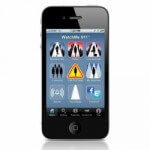
“For Women, by Women”, they tout. Although, anyone can use this application if they feel concerned or need help. The Watch Me 911 turns your iPhone into a security assistant. That way, you can continue with daily activities with a peace of mind.

There are three options when you download Watch Me 911:

  • Monitor Me
  • Panic
  • I’ve Arrived

Monitor Me is a timer activated alert. You set the timer before activities. If you don’t check in before the timer is up, friends are notified. They would then call you to make sure you are alright.

Panic is a simple button that you can use if you have to pass through questionable areas. Walking through the parking lot or a dark alley, for example. If you feel threatened, you double-tap the button and people are notified. You can also have 911 contacted.

I’ve arrived is an app that lets you get a message ready to let people know when you show up to your destination. When you get there, you send the message. That way, if you get right into business, you don’t have to stop your momentum to let people know where you are.

This application was created by Alice Armitage and Jill Campbell. As businesspeople, mothers and women, they felt the need to have an application like this. They also felt that other women (and men) might also need a personal assistant program.

The application is fee-based. You get a 30 day free trial, and if you like the app, you can either pay $9.99 a month, or $99.99 a year for all three products (with 2 months free).

GNC-2011-09-22 #707 Big Move by Facebook?

Posted by geeknews at 1:06 AM on September 23, 2011

I spend a huge amount of time on the Facebook economy plus a huge stack of news and information. As always a full 60 minutes of tech content for your listening or viewing pleasure.

Update: For the first time in the history of the show, I had to go in and do some post show editing. Pretty big gaf on my part but it was to big to let the original file remain.

Sponsored by:
MozyPro Online Backup: Simple, Automatic & Secure Backup http://mozy.com/pro
25% off 4GH GoDaddy hosting plans (12 months+) Use Promo Code CES2
Lock in a .co domain forever for $17.99 at GoDaddy Use Promo Code “DOTCO4”
GoDaddy services saves you lot’s of money, check out my Promo Codes Today
GoToMyPC access your computer Free for 30 Days!

Subscribe Today: Audio | Video (HD) | Mobile Video | iTunes | Zune
Download the Show File

Follow me on Google+
Follow @geeknews on Twitter
Geek News Central Facebook Page
Purchase GNC gear from the Ohana Store!
Show Hotline 24/7 1-619-342-7365 or e-mail geeknews@gmail.com


Listener Links:
Netflix Stock Crashes.
The Pirate Party.

Show Links:
Speed of Light Broken?
VIA wants Apple iPad, iPhone sales halted.
Whitman in as HP?
EX HP CEO gets 25 Million.
Facebook we own the Web.
Your Life on Facebook.
Story of your Life?
Facebook Music.
Mark Zuckerberg #14th Richest.
Google on the Grill.
TBS and TNT coming to Google TV.
Google+ for all and New Hangout Features.
Google Hangout API.
Global Warming Info Classified?
OnStar tracking and selling your info?
Go get your Warrant.
FOIA on Bart Mobile Net Shutdown.
Blockbuster Streaming Service.
Net Neutrality Rules go in Effect 11-20.
Sprint Wireless Caps for ALL?
ISP Code of Conduct.
iPhone’s?
Microsoft Gives data to FBI.
Stumbleupon mixes it up.
Verizon Supports AT&T and T-Mobile deal?
Breast Cancer Treatment Promising.
Space Aurora Video.
Boxee of to UK.
Roku YouTube Channel.
Apple NFC Patent.
Italian one Strike Rule Ridiculous.
uTorrent Update.
Mozilla slows Revs down.
Firefox 7 Next Week.
Nikon New Cameras.
Telco Gaining TV Subs?
Pandora free plus HTML5.
YouTube Video Editing.
Anon and Lulzsec Ops in Jail.
Anon on Sept 24th War.
Best Buy 1996.

Credits: Jack Ellis – Executive Producer

PlayPlay

FCC Opens White Space for Testing

Posted by KL Tech Muse at 1:40 PM on September 22, 2011

On Sept 19 the FCC opened up white space for testing for 45 days. What is white space and why is it important and the use of it controversial. White Space is the part of the frequency spectrum that is not being used. It came about with the switch from analog to digital. Because digital doesn’t use as much band width as analog there were spaces between channels that were not being used. These are known as white spaces. The FCC is now allowing companies to register and start testing devices within the white spaces for 45 days. One of the biggest controversy about white space is the problem of interference and how much space is needed between bands to avoid it. Spectrum Bridge a Florida based company has created the first database that shows where white space is available. That is the data base that is being used and tested. Other companies, including Google have registered to be white space administrator. Once the testing is done, then the FCC will review the results and see where interference occurred and what corrections need to be made.

What makes this test and white spaces themselves important is one use for it is what is known as Super Wifi. Super Wifi uses the lower frequency that exist within the white space. This allows it to travel the frequency to travel much further then traditional wi-fi does. It will also penetrate walls. Super wi-fi could be a boon for less populated areas where companies don’t want to spend the money to put in cables or fibre. The FCC has limited the wattage that can be used to 40 watts, this may or may not cut Super Wifi capability. Super Wifi will probably not be practical in more populated areas, where TV bands are much closer together and there is less white space available.

The National Broadcast Association is fighting the use of white space as it has been laid out by the FCC. They say it does not provide enough space between bands to avoid interference. Now lets be clear the area of the spectrum known as white space used to be license to TV companies under the old analog system. I suspect that they were not happy with the whole idea of white spaces. Companies like Google, Intel and Microsoft are looking forward to being able to use white space for not only wi-fi, but also Bluetooth devices. They may have to wait awhile, the Spectrum Database is first of many databases that have to be tested and the results evaluated. Just the testing itself is going to take over 300 days add to that the evaluation period and you are probably looking at late 2012 before white space will be available for commercial use. Once it is the possibilities could be limitless, but will unfortunately will probably be limited.

Tablets: Serious Computing Devices or Toys?

Posted by Alan Buckingham at 5:35 PM on September 21, 2011

exopc slate

I ran across an article on Electronista in my news feed today that really got me thinking.  It seems a new survey conducted by Citigroup found that, of 1,800 people surveyed, 62% of those planning to purchase a tablet considered the purchase “a toy” (you can read a more in-depth analysis of the survey at that link).  After a few minutes of thought I realized that I feel, somewhat, the same way.  The majority of this survey likely encompasses average users.  Sure, I plug a keyboard into a tablet and work, but my family finds it pure entertainment.

With the addition of Google Docs and, now, Office Live 365, a tablet can be a work environment that’s easy to carry when you’re on the go.  Of course, you’ll need a real keyboard because nobody wants to type a long article or Word doc on the on-screen equivalent.  Throw in email as another productivity chore that can be tackled when using it as a computer, but again, if the response is in-depth, you may want that keyboard.  Meetings can be handled via Skype or Google+ Hangouts, so there is yet another productivity app that you have with you in an easy-to-carry device.  But, most I have named require a real keyboard, which adds to the bulk.  You may even want a mobile mouse if you’re really serious.  Oh, and you will need a stand to use it this way also.

My wife and kids and the majority of the computing public?  They want a tablet to play games, check social media, browse the web, read a book with the Kindle app, use a remote control app for the home theater, check sports scores, and on and on.  In short, it’s a toy for them.  They will never plug in a keyboard or mouse to it, they will never write a document on it, they just don’t see it that way.  To them, that’s what desktops and laptops are for.

For all of the talk about the PC being dead, I think the diagnosis may be a bit premature, or as Mark Twain put it “rumors of my demise have been greatly exaggerated.”  Even for business travelers the notebook is still the number one tool.  After all, who wants to carry, and hook-up, all of those accessories?

So, am I missing something here?  Do you feel differently?  Are tablets really ready for prime-time when it comes to real computing tasks and day-to-day work?  Let me know in the comments below.

Five Backup Solutions to the Cloud for Your Computer

Posted by MikeBaine at 11:30 AM on September 21, 2011

In this computer day and age, you want to make sure pictures, documents and more are backed up on a daily basis. Especially with hard drives that fail every day and notebooks that get stolen every day. Even if you get your stolen computer back, the thieves might have done damage like wiping the hard drive or dropping the machine altogether.

I back up my machines to different sources. I have 2 home backups and one cloud backup. The cloud backup can also be a great way to share pictures through an iPhone, Android or iPad application. Nonetheless, if my computer drive dies, if there is fire or water damage, if someone steals my computer, I don’t lose the data.

Advantages to Cloud Based Backup

  • Off-site data retention
  • access to data from multiple computers or mobile devices
  • software that will start backing up files when computer is idle
  • High encryption on backup
  • Cloud based service runs their own backups – Your data gets backed up by them, too!
  • Prices are low – There are some services that are free to a certain level.
So here are Five cloud backup solutions you can employ now:

MyPCBackup

My PC Backup

My PC Backup

MyPCBackup was ranked #1 by Top 10 Online Backups. With unlimited backup, you can make sure all your pictures, documents and more are safe. They have an option to sync multiple computers through a folder on the machine.  They also offer a money back option and full customer support.

Mac users won’t be able to use this program, which is a major downfall to this program. The “1 PC, 1 Mac” per household ratio is growing. There is also no mobile application so you can view your backup files.

Carbonite Online Backup

Carbonite Online Backup

Carbonite Online Backup

One of the more popular online backup systems is Carbonite, this unlimited backup lets you view your files from any computer, or through an iPhone, Blackberry or Android application.  Carbonite also has accidental deletion option, which means if you delete a file that was backed up, you have 30 days to restore it.

Carbonite also works on PC and Mac systems. Therefore, you could backup all your items from the old computer, switch the program to Mac and download the files. There is full customer support if needed.

Mozy Online Backup

Mozy Online Backup

Mozy Online Backup

Mozy online backup is also a PC or Mac backup. You can access your data from an iPhone and Android (no Blackberry) application. They also offer on-site backup, which means you can set up a USB hard drive and Mozy will backup to that as well. Full support and they also offer the ability to restore a file up to 30 days after deleted.

Mozy does not offer unlimited backup, though. $5.99 /month  for 50 GB and $9.99 for 125 GB. For a standard computer, you might not fill that spot – unless you take tons of pictures or create video like myself.

DropBox

Dropbox

Dropbox

You might not think of Dropbox as a online backup. However, with their open API, there are a lot of things that Dropbox can become. You can use it to sync with other computers, so it’s a great collaborative tool.

Keep in mind, it doesn’t tout itself as an online backup. You do get some great options, like short-term backup recovery.

They do have a free service for the first 2 GB, then pricing options after.

iBackup

iBackup

iBackup

iBackup is a backup for not only PCs and Macs, but also Servers. You can also back up your MySQL, Linux box Exchange, Oracle and iPhone. Therefore, it’s a full corporate backup solution. It gets pricey fast, but if you need 1.5 Terabytes of data that has to be backed up, this is a great solution.

They also have a “30 version” backup – If you change a document 29 times, then realize you need to start from the beginning, you can go into your account and pull up the first version. That can help if someone messes up a document and you don’t realize it right away.

There are  other online backup options, too. This includes items like PogoPlug or Drobo, where the files are stored at your home site. Elephantdrive, Livedrive, KeepIT are some other online backup tools.

Since it’s your data, you should research each program and see if it’s right for you. But if you have important data and need to back it up, then these options might help you with that solution.

There are also some great software solutions if you want to backup your computer to another computer. If you are on a Mac, then Time Machine is a feature you can set. Everything from backing up folders to making a full image of your computer to restore at a moments notice.

Most important – Back it up now, because you never know if you’ll get a chance to back it up later.

BBC Beta Homepage for the Post-PC Era

Posted by Andrew at 7:40 AM on September 21, 2011

The BBC is embracing the post-PC world with a reworked homepage at beta.bbc.co.uk. Here’s what it looks like on my TouchPad.

The black arrows on either side slide the screen through three other views. It’s a little bit reminiscent of how the BBC’s iPlayer displays programmes on my Bluray player, which isn’t entirely unsurprising. Some of the other features, such as setting your location, aren’t yet working but will be fixed before this version becomes the standard interface.

Compare this with the current mobile version of the site and you’ll see the change.

The BBC’s homepage was probably due for a refresh anyway, but I think it’s fairly telling that the new page is going to look the way it does. One can only assume that the BBC has stats on the web browsers being used to visit their site and they show the trend towards tablets and mobile devices. Is this the post-PC era with touch now driving the user interface, rather than keyboard and mouse?

Carbyn – An HTML5 OS

Posted by Andrew at 2:19 PM on September 20, 2011

There’s been a great deal of speculation in the blogosphere regarding a new entrant into the apps-that-run-anywhere competition. Called Carbyn, it seems to be an HTML5-based OS and app store. If you are struggling to see how this is a good thing, most modern browsers support HTML5, so you can setup and use Carbyn from almost any computer or tablet that has an Internet connection. No worrying about Windows, OS X, Linux…you just get on and do what you want to do.

The London, Ontario-based company is holding its cards fairly close to its chest and is using social media to spread the word. TechCrunch managed to get a sneak peak and point out that while comparisons with Google’s Chrome app store are inevitable, it’s different in that Carbyn is an OS. Chrome apps run within the browser, Carbyn HTML5 apps run within the Carbyn desktop which runs within the browser.  Facebook is also expected to get in the HTML5 app action with its Project Spartan, so it’s an interesting space to watch.

Carbyn is using social media and word-of-mouth to good advantage. While you can sign up for an invite to join Carbyn on their website, you’ll get your invite faster, if you get your friends to also sign up for an invite. So if you are interested, please use this Carbyn link to boost my standing. I’m shameless and I’ve fallen for their cheap trick…

And yes, Carbyn appears to have Angry Birds….

Tinker, Tailor, Soldier, Spy

Posted by Andrew at 1:25 PM on September 20, 2011

This year’s BBC Reith lectures came to a close today with the last of three lectures on Securing Freedom, presented by Eliza Manningham-Buller. The name may mean nothing to you but she was the Director-General of Britain’s Security Service, aka MI5, between October 2002 and April 2007, and she reflects on 9/11, the wars in the Middle East and how the world has changed in the last ten years.

The three lectures are titled, “Terror“, “Security” and “Freedom” and a give a British perspective on the role of the intelligence services and the relationship with the US during a period both countries were under attack. If you are a seasoned spook-watcher, there’s probably not that much new, but I personally found it revealing and reassuring that the British Security Service is more measured and ethically-minded than the media would have us believe.

Baroness Manningham-Buller doesn’t shy away from controversy either, steadfastly refusing to accept torture as an intelligence tool, and suggesting that the US’ use of waterboarding was a “profound mistake”. You’ll have to listen to the podcasts to understand her reasoning.

The lectures are available as podcasts and also as transcripts for those who would prefer to read.

Celebrate National Piano Day with a Korg MicroPiano

Posted by KL Tech Muse at 11:52 AM on September 20, 2011

MicroPiano Back in 1991 the Piano Foundation wanted to encourage the playing and appreciation of the piano and piano music. They made Schroeder from Peanuts their spokesman and announced that September would be National Piano month. Which makes this a perfect time to start your children with piano lessons or perhaps take up the piano yourself. Growing up we had a piano at home and took piano lessons. The piano we had was nothing fancy. it was a normal upright piano. It sounded ok, but if you really wanted a great piano sound, the answer was and still is a grand piano. Now you could go out and buy a grand piano. However for most of us that is not very practical in terms of budget or space. Plus an upright or grand piano are clearly not very portable. So there are two problems with a piano either upright or grand, size and expense.

If you are looking for a piano that is both portable and not too expensive a possible solution is the Korg MicroPiano. The MicroPiano is 30.79 x 11.46 x 5.47 in and weighs 11.46 lbs. It has a lid that opens and props up like a grand piano. It comes in red and black. It has 61 keys. The keys feel natural and produce a robust and grand piano like sound through built-in speakers. You can also connect it to an external amplifier. It has multiple sound programs including, harpsichord, toy piano, clavinet, vibraphone, marimba, celeste, kalimbas, steel drum, music box, steel drum, organ, flutes, accordion, strings, harps and bells. There are 40 Demo songs available. It can run off of either DC 9 volt power or 6 AA batteries. It does have a headphone/line-out stereo jack. It also has a damper pedal connection where you can connect an optional damper pedal. Because this piano is so compact, it is highly portable and is great for parties and get together. It is perfect for beginners and experts alike. It is available for $299 and through various online retailers.