![]()
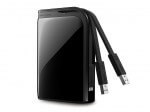
Buffalo’s MiniStation portable USB 3.0 hard drive is a 500 GB SATA 2.5″ HDD in a small and not unattractive package. Coming in crystal white (and piano black), it will certainly appeal to those who want to match their white Apple products without wanting to pay for the Apple logo.
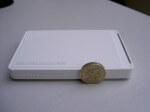
Size-wise, it’s very pocketable, measuring just 114 x 77 x 13 mm. The photograph below shows the MiniStation next to a British pound coin (Welsh version) to give an idea of scale. Easily popped into a bag or jacket and the smooth corners should avoid tears or pokes in the ribs.

There’s a single connector on one of the short sides – it’s a micro-B USB 3 socket which can be seen in the photos below along with the necessary cable. This was the first time that I’d seen a micro-B USB 3 connector and there’s detail on the pins at Wikipedia. As is expected on a portable external drive, the MiniStation is bus powered so there’s no additional power supply.


Looking at the photos, the dark line on the side is actually an LED light. In use, when connected to a USB 3 port, the dark strip on the side is bright blue. When connected to just USB 2, the light is green. The light is steady when the MiniStation is simply connected and it flashes during read and write.
Performance-wise, the MiniStation was tested using an HP dv9000-series laptop, with the USB 3 being provided by a Buffalo Interface ExpressCard, which was reviewed earlier in the week.
On a standard USB 2 port, I got about 180 Mb/s write and 225 Mb/s read. With the MiniStation on USB 3, I was able to get write speeds of about 285 Mb/s and 420 Mb/s on read. For comparison, a generic external 2.5″ IDE drive was just able to hit 100 Mb/s. Please remember that these figures relate to my particular combination of laptop configuration and testing software. Your mileage may vary.
There’s no installation CD as the additional software is included on the MiniStation itself. Running the main installer gives the option to install a couple of “turbo” tools to increase performance, an EcoManager, some RAM disk software and a backup utility. There’s also a copy of Picasa.
The MiniStation USB 3.0 comes in 500 GB and 1 TB versions. RRPs are £69.99 and £109.99 respectively, but prices will generally be a bit less. As a side note, the MiniStation USB 3.0 doesn’t seem to be widely available yet, so it’s difficult to check on real-world prices. Competitor products seem to be around the £60 mark.

If your laptop is like mine and pre-dates USB 3 but you want to use USB 3 devices at their full speed, then you might be interested in the 


Mid-March, Buffalo announced the LinkStation Quad Pro, a 4 TB and 8 TB NAS aimed at the home prosumer. It can stream music and film to popular consoles such as the Xbox 360 or PlayStation 3, and also to any DLNA or uPNP media player. A new feature is support for the Logitech Squezebox which will please music lovers. For photographers, the “DirectCopy” feature uploads pictures from digital still or video cameras direct to the LinkStation. And finally, the new Android version of Buffalo’s WebAccess i app gives access to the multimedia from anywhere in the world. (When’s the WebOS version coming?)
Last week, it was the turn of the external drives, with the MiniStations and DriveStations getting the upgrade treatment. The MiniStation gets a capacity bump to 1 TB and now comes in a glossy black finish. The DriveStation also gets the piano treatment but now comes in two variants: for the price conscious, there’s a USB 2 version in 1 TB and 2 TB capacities but for the speed freaks, a USB 3 version (1, 2 & 3 TB) will satisfy their needs. Available now from all good retailers.
In the box, you get the MicroStation SSD, a quick setup manual, the True Image DVD and a USB cable. In your hand though, the SSD is a pretty boring lump of plastic. An HDD is much more solid and satisfying but that’s progress for you. The model reviewed here is the SHD-NSUH256G-EU.
Once you’ve fired up the laptop, you’ll be totally amazed at how much faster it’s become. It’s like buying a new computer! In my thoroughly unscientific testing, with the HDD installed my laptop took about 50 seconds to get to the Windows 7 login screen from power on, of which about 10 seconds was the BIOS checks. On logging in, it took 20 seconds to show the desktop background and a further 40-odd seconds to show the Windows Sidebar. Basically from pressing the power button to having a working laptop takes 2 minutes.
First up, was the
Next was the
The WCR-GN supports WPS and AOSS, Buffalo’s equivalent. Frankly, I could never get the AOSS pairing to work. It’s so little effort to put in an encryption key, I’ve no idea why anyone bothers with these user-friendly time savers, because they never are and never do.
Finally, I got out the
The
The big brother of the Pro is the