Geek News: Latest Technology, Product Reviews, Gadgets and Tech Podcast News for Geeks


Tag: ethernet

D-Link Shipping 1,750Mbps Router

Posted by Alan Buckingham at 6:14 PM on July 17, 2012

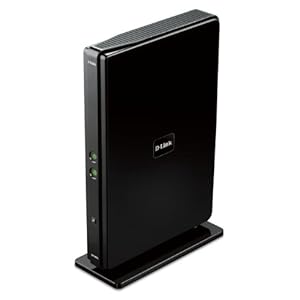
If you follow tech news then you may have already heard that there is a new WiFi standard coming.   Today, router maker D-Link began shipping their first product using the 802.11ac standard.  The company claims a staggering 1,750Mbps speed for The Cloud Router 5700 (DIR-865L).

According to reports, the router is “capable of reaching speeds of up to 1,750Mbps speeds when operating in this dual mode, which is made up of 1,300Mbps wireless-AC and 450Mbps wireless-N speeds.”  The router also contains a cloud app that makes it accessible from anywhere in the world.  In addition, there is also an app that allows users to connect a mobile device to the USB port and share data across it.  Finally, there are also four 10/100/1000 ethernet ports for gigabit wired connections.

The new router carries an MSRP of $190 U.S. and is available from various online retailers such as Amazon.  Of course, the router is backwards compatible for all of your current devices.

D-Link Systems, Inc. Amplifi Cloud Router 5700 (DIR-865L)

Wi3 Uses Coax for Ethernet Networking

Posted by Andrew at 9:29 AM on February 21, 2012

Wi3 CartridgesThe folks at Wi3 have developed a new and innovative way of using the cable TV co-ax wiring to carry more that just pictures. Jeffrey and Andy find out more from Adam.

The Wi3 system replaces the cable wallplate with a modular unit that offers a range of connection or transport options. The first two modules offer twin ethernet ports or a single ethernet port with wifi access point. Later modules may offer a built-in “set-top box”  with HDMI out or a small PC could even be squeezed in. And all without affecting the cable TV signal by using MoCA technology.

It only takes about five minutes to install and one of the neat things I like about this product is that the connections come sideways out of the unit. Consequently, it looks more attractive and less noticeable in the home.

The first two modules are only available to dealers at present but they will be stocked in big boxes nationwide later in the year. Prices are $150 and $200 for the ethernet only and wi-fi models respectively.

Interview by Jeffrey Powers of Geekazine and Andy Smith of Geocaching World.Sponsored by:
On new orders get 35% Off your GoDaddy Order use Promo Code:go35off2
GoDaddy Promo Codes always save you money, check out my Promo Codes Today

PlayPlay

Diamond Wireless Range Extender and Set-Top Box Preview

Posted by Andrew at 8:31 AM on February 15, 2012

Diamond Wireless Range Extender WR300NI remember building a PC many years ago and at that time, Diamond Multimedia was one of *the* graphics card companies. I even seem to remember that it was VL-bus card, so that dates it to a pre-Pentium era. Anyway, it’s great to see that Diamond is still around when so many others have fallen by the wayside. Todd interviews Louis Kokenis from Diamond Multimedia on the latest products.

The Diamond Wireless Range Extender has three functions in one. First, it’s a wireless repeater that eliminates deadspots in wireless coverage. Second, it’s a wireless bridge that will connect a wired network device to the wireless network and third, it’s a standalone wireless access point, creating wireless hotspot from a single network point. With regard to the last mode, the WR300N’s small size means that it’s great for travelling and creating a wireless network in a hotel room. On-sale now for around $60.

Diamond will be introducing an Android-based TV set-top box that combines web browser, media player, ebook reader, game console, anything that can be downloaded from the Android Market. It won’t be tied to any particular media provider as it will either be able to download an app, e.g. Netflix, or else it will be able to browse to any website and play media directly. Sounds cool, especially if it runs ICS.

Interview by Todd Cochrane of Geek News Central and Steve Lee of NetCast Studio for the TechPodcast Network.

Sponsored by:
On new orders get 35% Off your GoDaddy Order use Promo Code:go35off2
GoDaddy Promo Codes always save you money, check out my Promo Codes Today

PlayPlay

HomeGrid Forum Shows Off “Any Wire, Anywhere” Technology

Posted by Alan Buckingham at 8:27 AM on February 3, 2012

homegrid forum logoHomeGrid Forum may not be a household name, but if you are looking to build-out the best home network imaginable then you may want to check out their technology.  HomeGrid Forum is made up of many major companies from around the world such as AT&T, Intel, Best Buy, Motorola, Marvell, and others.

Using G.hn, a home networking standard that you can learn more about from Wikipedia, you can stream up to 1 gigabit of data across any wire in your home.  That means everything now becomes a potential network connection – power outlets, coax connectors, and phone jacks – creating a whole-home smart grid.

Products are now coming to market that will make all of this work.  Consumers just need to look for products with the HomeGrid Forum logo on them to know that they are compatible.  Products from different vendors and even different chipset makers will all work flawlessly together.  HomeGrid Forums promises this new technology will be priced to compete with current solutions already on the market.  You can get more information at HomeGrid Forum and see demos of the technology in use in the video below.

Interview by Jon Wurm of F5 Live.

Sponsored by:
On new orders get 35% Off your GoDaddy Order use Promo Code:go35off2
GoDaddy Promo Codes always save you money, check out my Promo Codes Today

PlayPlay

Trendnet Compacts Powerline Adapter

Posted by Andrew at 8:50 AM on January 7, 2012

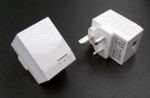
At CES, TRENDnet has launched the world’s smallest 500 Mb/s Powerline adapter with the new TPL-406E model. Look at the picture below to see the difference in size between a standard Powerline adaptor and the new model on the left. When trying to get all the modern gadgets plugged in and networked, this will certainly help where there is limited space or close electrical sockets.

TPL-406E Trendnet Powerline adaptor

“Consumers are looking for solutions to help connect their TVs to the Internet and TRENDnet Powerline products couldn’t be easier-with no complicated CD installation required,” stated Sonny Su, technology director for TRENDnet. “The TPL-406E defines a new category of ultra-compact high performance 500 Mbps Powerline adapters.”

More and more audio-visual equipment needs to be networked. In my living room, I think there are three ethernet devices (TV, satellite decoder and Bluray player) and I use a 100 Mb/s Powerline device to take the network to them. For this kind of equipment, Powerline is much more convenient than trying to setup a wireless bridge.

Available from April at all good retailers, the TPL-406E will be $60 on its own or $100 in a twin pack, TPL-406E2K.

Network Switches and Data Transfer Speeds

Posted by Andrew at 5:17 PM on March 27, 2011

I recently upgraded my home network from 100 Mb/s to 1 Gb/s by replacing the switches. The main house switch is an unmanaged 1U rack-mounted switch, with a second desktop switch. Out of pure interest, I took the opportunity to do a little bit of speed testing to see how much of a difference upgrading the switches made in terms of actual data transfer speeds.

A few basics to avoid confusion  – b/s is bits per second and B/s is bytes per second. All of the reported figures will be in MB, so converting b/s to B/s:
Fast Ethernet = 100 Mb/s = 12.5 MB/s
Gigabit Ethernet = 1 Gb/s = 125 MB/s

100 Mb/s and 1 Gb/s refer to the speed of the underlying technology but data transfers at these rates are never achieved because of protocol overheads and such. As a baseline, if I write a large file (8 GB) to my PC’s local disk, I get a data transfer of between 50-55 MB/s.

On my network, I have two Buffalo Linkstation NAS devices, one with a Fast Ethernet interface and one with a Gigabit Ethernet interface. 2 GB’s worth of data would be written to each of these devices with different Ethernet switches in place to see what actual data transfer speeds would be achieved. The following Linux command was used five times in each situation and the result averaged.

time dd if=/dev/zero of=testfile bs=16k count=16384
Switch Model Data Rate to Fast NAS Data Rate to Gigabit NAS
1U Rack
Dynamode SW240010-R(Fast) 6.2 MB/s 8.6 MB/s
TP-Link TL-SG1016 (Gigabit) 6.4 Mb/s 21.4 MB/s
Desktop
D-Link DES-1008D (Fast) 6.2 MB/s 8.6 MB/s
Netgear GS605 (Gigabit) 6.5 MB/s 21.1 MB/s

I also carried out two further tests:

  1. With Gigabit Ethernet only, I wrote to both NAS devices at the same time. The data transfer speeds were unaffected.
  2. I connected the two Gigabit Ethernet switches in series and wrote to the NAS. Transfer speeds were reduced by 1 MB/s on the Gigabit NAS to 20 MB/s. The change on the Fast Ethernet NAS was minimal.

There are several things that can be deduced from the information shown in the table above and the other tests.

  1. Actual data transfer rates are considerably less than the theoretical maximums.
  2. There’s no performance difference between rack-mounted and desktop switches.
  3. The write speed of the NAS can be a limiting factor.
  4. Gigabit Ethernet switches give large improvements with Gigabit Ethernet devices.
  5. Gigabit Ethernet switches give small improvements even with Fast Ethernet devices.
  6. Keep the number of switches in the network path to a minimum.