Geek News: Latest Technology, Product Reviews, Gadgets and Tech Podcast News for Geeks


Tag: external hard drive

G-Technology G-Drive Mobile Review

Posted by Andrew at 5:05 PM on March 17, 2013

On review today is the G-Technology G-Drive Mobile, a 1 TB mobile external hard drive. Aimed squarely at the Apple MacBook crowd, the brushed aluminium finish and white LED compliments the host machine, and the combination of both USB3 and FireWire 800 show its Mac heritage. Of course the drive can be formatted for Windows or Linux use but the G-Drive is pre-formatted for HFS+ and is TimeMachine-compatible. As expected, the G-Drive is bus powered so there’s no power adaptor.

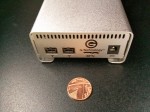
G-Drive Mobile


G-Drive Mobile Ports

The G-Drive Mobile has a couple of touches that set it apart from the other mobile drive offerings. To start with, it comes with all the cables that might be needed, so in the box there’s a USB3 cable, a FireWire 800 cable and a FireWire 400 to 800 cable. There’s no getting the box home only to find the cable need for your setup is missing.

G Drive Mobile Cables

Second, the packaging presents the G-Drive to best effect and the “Getting Started” instructions are printed on the inside  lid of the box. Again, it comes back to appealing to the Apple crowd who expect good design.

G-Drive Package

But enough of how it looks. How does it go? Pretty well actually. Connected up to USB 3, the G-Drive Mobile recorded the following data rates:

hdparm gave 107 MB/s for buffered disk reads.
dd gave write speeds around 105 MB/s.
- bonnie++ gave 104 MB/s for writes and 141 MB/s for reads.

I’m fairly sure that those figures make G-Drive Mobile the fastest USB3 unit tested, beating the previous holder by a considerable margin. Under FireWire 400, the figures were obviously slower, but are provided here for comparison.

- hdparm gave 36 MB/s for buffered disk reads.
- dd gave write speeds around 22 MB/s.
- bonnie++ gave 22 MB/s for writes and 55 MB/s for reads.

Price-wise, the model here costs £129.95 but if you want USB3 only, there’s a much sleeker and cheaper version at £109.95 in the Apple store. However, if you need FireWire with USB3, the model viewed above is hard to beat, giving historical compatibility with older gear while also offering fast data transfers on newer kit.

Thanks to G-Technology for providing the G-Drive Mobile to review.

Rocstor Encrypted External Hard Drives

Posted by Andrew at 6:12 PM on February 25, 2013

Rocstor LogoRocstor specialise in data storage and secure encryption solutions: that’s encrypted external hard drives to you and me, but it’s an increasingly important market. Andy and Scott talk to Anthony Rink from Rocstor about how their products can keep your data safe.

Rocstor offers a range of external data storage products with real-time encryption built-in as standard. The encrypted drives meet FIPS Level 2, meaning that it’s hardware-encrypted (not software) and that any tampering of the drive to get at the crypto keys is obviously apparent. To suit different circumstances, some models use tokens, others PINs and some use both with ruggedised and waterproof units also available. Depending on features, $250-$300 gets you 1 TB of secure external storage.

Interview by Andy McCaskey of SDR News and Scott Ertz of F5 Live for the TechPodcast Network.

Sponsored by:
35% off your very first order @ Godaddy.com: Promo Code 35off1
GoDaddy Promo Codes always save you money, check out my Promo Codes Today


PlayPlay

Pextor’s PlexEasy Burns Without The PC

Posted by Andrew at 1:48 PM on January 11, 2012

Plextor LogoToday at CES International, Plextor announced the PlexEasy, a standalone external 8x DVD and CD burner that will burn discs from SD cards and USB-connected devices without the need for a PC. It can connect directly to a wide variety of devices including both mass storage devices and Picture Transfer Protocol (PTP) devices such cameras, smartphones, tablets, and camcorders. Photos can be burnt directly from digital cameras and smartphones, regardless of OS, without copying the pictures onto a PC first or fiddling about with a disc-burning software.

With the Plextor PlexEasy, it’s now a three-step process:
1. connect the device,
2. insert a DVD or CD and
3. press a button to burn a backup.

The PlexEasy’s compatibility with mass storage devices allows almost any storage device to be connected – MP3 players, flash drives, external hard disks and even tablets. The PlexEasy can also copy from an inserted SD-card to the mass storage device for quick backups. Of course, the device can be connected to a PC and it then offers all the features of a high-end DVD burner with support for all types of CDs and DVDs.

Pictures, pricing and availability to follow.

Buffalo DriveStation Velocity Review

Posted by Andrew at 2:12 PM on November 13, 2011

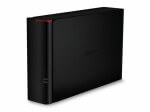
Buffalo LogoThe Buffalo DriveStation Velocity is a 2 TB USB 3 external drive, and given the size and the interface, it’s aimed at people who want lots of data and want it quickly. Let’s get the external features of the device out of the way and then check how quick it is.

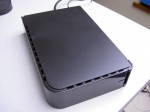
In the box, there’s only the drive, the power supply, USB 3 cable and the usual paper flimsies for getting started and warranty. There is no driver CD as the files are all on the disk, but more on this later. The drive housing itself is black plastic, with a matte finish on the larger sides and glossy piano black on the thinner side, with a disk activity light that glows blue when on USB3 and green on USB2. The unit can either stand upright or be laid on its side and stacked: I couldn’t decide what orientation I preferred but it seemed to spend most of its time lying down.

Buffalo DriveStation Velocity

Round the back it’s fairly sparse with a USB3 connector, power socket and Kensington lock socket. Observant readers will also spot that there’s no fan so the Velocity runs quietly with only the hum of the hard drive itself, possibly making this a good choice for the living room.  Even while the disk was being thrashed during the read and write tests, the case never got more than lukewarm.

Buffalo DriveStation Velocity Rear

Time for the speed tests. Connected up to USB 3, the Velocity recorded the following data rates:
hdparm gave 133 MB/s for buffered disk reads.
dd gave write speeds around 92 MB/s.
- bonnie++ gave 75 MB/s for writes and 137 MB/s for reads.

Under USB 2, the figures were obviously slower but still fine for a USB 2 device.
- hdparm gave 32 MB/s for buffered disk reads.
- dd gave write speeds around 37 MB/s.
- bonnie++ gave 33 MB/s for writes and 38 MB/s for reads.

Wow! The read speed of 137 MB/s makes the DriveStation Velocity the fastest single USB3 unit that Geek News Central has tested, which is pretty impressive.

As mentioned earlier, the driver and utility software comes installed on the disk rather than on a CD. Generally, this is great and cuts down on CD-waste, but it would be wise to take a copy of the software in case the disk needs to be re-formatted…

…which brings us to the included utility for whole disk encryption. It’s very handy for keeping your data from falling into the wrong hands in the event of theft or other loss, but the utility completely erases the disk as part of the encryption process! So it seems to me that there’s a bit of a problem here for a drive that includes encryption as a feature but then deletes the utility off the disk as step number one. There either needs to be a CD in the box or else the encryption utility needs to make a backup copy of the software locally.

Other than this small issue, I liked the Velocity. I had no trouble getting it to work, the styling was satisfactory and it performed well. In summary, if you need a quiet drive with lots of space and great transfer rates, then put the DriveStation Velocity on your shortlist. Just remember to copy the drivers and utilities off the disk before enabling encryption.

Thanks to Buffalo for the loan of the DriveStation Velocity.

Buffalo Gets Extreme

Posted by Andrew at 8:43 AM on October 19, 2011

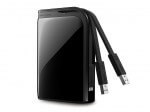
Buffalo Technology has announced the launch of the MiniStation Extreme, a ruggedised USB3 portable hard drive. Conforming to the US Military’s MIL-STD-810F 516.5 Procedure IV, the shock protection on this drive means that it will survive a fall from over 2 m or 6 ft.

Buffalo MiniStation Extreme Portable Hard Drive 

And if securing your data against physical damage isn’t enough, the MiniStation Extreme also comes with 256-bit AES whole/full disk encryption to prevent unauthorised access to your data. There’s an integrated USB3 cable which snaps in and out of the Extreme, keeping it all neat and tidy.

Paul Hudson, Sales Director for Northern Europe at Buffalo Technology said, “The MiniStation Extreme is a prime example of Buffalo’s commitment to product innovation. This latest addition to the MiniStation family is ideal for globetrotters who travel with their PCs and portable HDDs and demand a robust, fast and secure high performance portable storage device. The MiniStation Extreme can withstand free-fall drops of up to 2.3m making it the most robust MiniStation ever.”

The MiniStation Extreme is available in 500 GB and 1 TB sizes at £78 and £113 respectively, and comes in piano black, silver and red. No white yet for the iPhiles.

Freecom Mobile Drive Mg Review

Posted by Andrew at 4:01 PM on May 26, 2011

The Freecom Mobile Drive Mg is no ordinary 2.5″ external drive. It’s a thing of beauty. Intended to complement Apple’s MacBooks, the slimline Mobile Drive has a magnesium body that looks and feels great. The icing on the cake is that it’s USB 3. I’ve seen lots of external drives but this is the one you want.

Even the packaging reflects the target market. Instead of a relatively dull cardboard box, this comes in an acrylic box so that you can see drive before you’ve even purchased it. The model shown here is the slimline 320 GB USB 3 version which is just 1 cm thick. Freecom have used the bevelled-edge trick to make it seem even thinner than it is but it doesn’t detract from the fact that it is thin and Freecom claim that it is the world’s thinnest external drive. In addition to the 320 GB capacity, there are two 720 GB units which are a bit thicker at 1.5 cm – one is USB 3 only, the other is USB 3 and Firewire 800.

Apart from the USB 3 connector and the Freecom logo, the only other external feature is a white LED which indicates power and disk activity. It’s difficult to make out in the picture below as it’s not lit, but it’s pretty much right in the middle. The drive is bus powered so there’s no power supply needed.

The Mobile Drive Mg comes pre-formatted with HFS+, so if you have a Mac, you’re good to go out of the box. If you’re a Windows or Linux user, it can easily be reformatted to another format.

I think we’ve established that it looks good, but does it perform? Connected up to USB 3, the Mobile Drive recorded the following data rates:

- hdparm gave 75 MB/s for buffered disk reads.
- dd gave write speeds around 82 MB/s.
- bonnie++ gave 74 MB/s for writes and 85 MB/s for reads.

Under USB 2, the figures were obviously slower but still healthy for a USB 2 device.

- hdparm gave 30 MB/s for buffered disk reads.
- dd gave write speeds around 37 MB/s.
- bonnie++ gave 35 MB/s for writes and 40 MB/s for reads.

Looking at the data, using USB 3 roughly doubles the performance when compared to USB 2, which is not unexpected. If you are interested in the specs, there’s a datasheet .pdf.

Price-wise, the model here costs 79 euros, with the 750 GB model bumping the price to 119 euros. Adding the Firewire port will cost 10 euros extra.

You know you want one.

Thanks to Freecom for the loan of the Mobile Drive Mg.

LaCie External Hard Disk Review

Posted by Andrew at 2:38 PM on May 19, 2011

LaCie’s Hard Disk is a USB2 3.5″ external hard drive unit. Designed by Neil Poulton, it definitely comes from the minimalist school of design as it’s a shiny black box with a blue LED. The exterior is marred only by a discrete LaCie logo on one side; USB connector, power socket and on/off switch at the back. You don’t even see the LED itself, only the blue light reflecting off the desk.

And sometimes a box is just what’s needed, if you want stack or store the drives. All too often stylish designs prevent two units from being placed on top of each, taking up more space. This LaCie unit manages to be stylish and functional at the same time, though it’s a bit of a dust magnet at times.

I have two of the 1 TB drives and they form the heart of my backup strategy. Once a month, they get retrieved from storage, plugged in and the files synced with my NAS. Touch wood, I’ve not had any drive failures.

Performance-wise, it’s always hard to test reliably and consistently.  I’m on Linux, so I’ve a range of tools including dd, hdparm and bonnie++.

- hdparm gave 32 MB/s for buffered disk reads.
- dd gave write speeds around 43 MB/s, with reading closer to 50 MB/s.
- bonnie++ gave 34 MB/s for writes and 36 MB/s for reads.

Given that the maximum theoretical speed for USB 2 is 60 MB/s, these figures are pretty good. For comparison, bonnie++ gives figures around 100 MB/s for my main SATA drive.

Currently, the LaCie Hard Disk comes in 1 TB, 1.5 TB and 2 TB versions and if you look hard, the 1 TB unit can be picked up for around £50. Recommended.

Buffalo MiniStation Portable USB 3.0 Hard Drive Review

Posted by Andrew at 5:03 AM on April 22, 2011

Buffalo’s MiniStation portable USB 3.0 hard drive is a 500 GB SATA 2.5″ HDD in a small and not unattractive package. Coming in crystal white (and piano black), it will certainly appeal to those who want to match their white Apple products without wanting to pay for the Apple logo.

Size-wise, it’s very pocketable, measuring just 114 x 77 x 13 mm. The photograph below shows the MiniStation next to a British pound coin (Welsh version) to give an idea of scale. Easily popped into a bag or jacket and the smooth corners should avoid tears or pokes in the ribs.

There’s a single connector on one of the short sides – it’s a micro-B USB 3 socket which can be seen in the photos below along with the necessary cable. This was the first time that I’d seen a micro-B USB 3 connector and there’s detail on the pins at Wikipedia. As is expected on a portable external drive, the MiniStation is bus powered so there’s no additional power supply.

Looking at the photos, the dark line on the side is actually an LED light. In use, when connected to a USB 3 port, the dark strip on the side is bright blue. When connected to just USB 2, the light is green. The light is steady when the MiniStation is simply connected and it flashes during read and write.

Performance-wise, the MiniStation was tested using an HP dv9000-series laptop, with the USB 3 being provided by a Buffalo Interface ExpressCard, which was reviewed earlier in the week.

On a standard USB 2 port, I got about 180 Mb/s write and 225 Mb/s read. With the MiniStation on USB 3, I was able to get write speeds of about 285 Mb/s and 420 Mb/s on read.  For comparison, a generic external 2.5″ IDE drive was just able to hit 100 Mb/s. Please remember that these figures relate to my particular combination of laptop configuration and testing software. Your mileage may vary.

There’s no installation CD as the additional software is included on the MiniStation itself. Running the main installer gives the option to install a couple of “turbo” tools to increase performance, an EcoManager, some RAM disk software and a backup utility. There’s also a copy of Picasa.

The MiniStation USB 3.0 comes in 500 GB and 1 TB versions. RRPs are £69.99 and £109.99 respectively, but prices will generally be a bit less. As a side note, the MiniStation USB 3.0 doesn’t seem to be widely available yet, so it’s difficult to check on real-world prices. Competitor products seem to be around the £60 mark.

Clickfree Automatic Backup

Posted by Andrew at 10:46 PM on February 8, 2011

Andy McCaskey invites Ian Collins of Clickfree into the booth to talk about ClickFree’s automatic backup solution. I think all of us know that we’re supposed to backup our hard drives and memory cards, but how many of us actually do it? Not many going by the number of times friends have phoned me up to see if I can undelete files or recover hard drives that have gone south.

Clickfree provide “the ultimate backup experience”, a combination of idiot-proof software and external USB harddrives which makes backing up and restoring files absolutely painless. No software is installed, it’s that easy.

And if you couldn’t even be bothered to plug in a USB drive, Clickfree have released a wireless version of their backup solution, the C3 Wireless Automatic Backup. Connect the unit to each PC, laptop (or Mac) in turn to initialise the software and settings, then simply leave it connected up to the power on a shelf and it does it’s business. 500 GB costs $179, 1 TB is $249. What price peace of mind?

Interview by Andy McCaskey of SDR News.

Please Support our CES 2011 Sponsors.

Save 25% on 4GH Hosting 1yr Subscriptions Save 25% Promo Code CES2.

LaCie USB3 Memory Sticks and Hard Drives

Posted by Andrew at 9:12 AM on January 25, 2011

Andy speaks to Philip of LaCie on the latest USB 3.0 devices from LaCie, including the new highspeed FastKey USB3 SSD memory stick which comes in 30GB, 60GB and 120GB sizes – yes, that’s 120GB in a memory stick, so don’t lose it! Also on show were USB3 upgrades across the range, including ruggedised external drives and designer models.

Interview by Andy McCaskey of SDR News.

Please Support our CES 2011 Sponsors

Get your 14 day Free Trial of Audible Gold to start Listening to great Books!
Save 25% on 4GH Hosting 1yr Subscriptions Save 25% Promo Code CES2.