Geek News: Latest Technology, Product Reviews, Gadgets and Tech Podcast News for Geeks


Tag: USB 3.0

Buffalo MiniStation Portable USB 3.0 Hard Drive Review

Posted by Andrew at 5:03 AM on April 22, 2011

Buffalo’s MiniStation portable USB 3.0 hard drive is a 500 GB SATA 2.5″ HDD in a small and not unattractive package. Coming in crystal white (and piano black), it will certainly appeal to those who want to match their white Apple products without wanting to pay for the Apple logo.

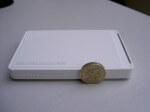
Size-wise, it’s very pocketable, measuring just 114 x 77 x 13 mm. The photograph below shows the MiniStation next to a British pound coin (Welsh version) to give an idea of scale. Easily popped into a bag or jacket and the smooth corners should avoid tears or pokes in the ribs.

There’s a single connector on one of the short sides – it’s a micro-B USB 3 socket which can be seen in the photos below along with the necessary cable. This was the first time that I’d seen a micro-B USB 3 connector and there’s detail on the pins at Wikipedia. As is expected on a portable external drive, the MiniStation is bus powered so there’s no additional power supply.

Looking at the photos, the dark line on the side is actually an LED light. In use, when connected to a USB 3 port, the dark strip on the side is bright blue. When connected to just USB 2, the light is green. The light is steady when the MiniStation is simply connected and it flashes during read and write.

Performance-wise, the MiniStation was tested using an HP dv9000-series laptop, with the USB 3 being provided by a Buffalo Interface ExpressCard, which was reviewed earlier in the week.

On a standard USB 2 port, I got about 180 Mb/s write and 225 Mb/s read. With the MiniStation on USB 3, I was able to get write speeds of about 285 Mb/s and 420 Mb/s on read.  For comparison, a generic external 2.5″ IDE drive was just able to hit 100 Mb/s. Please remember that these figures relate to my particular combination of laptop configuration and testing software. Your mileage may vary.

There’s no installation CD as the additional software is included on the MiniStation itself. Running the main installer gives the option to install a couple of “turbo” tools to increase performance, an EcoManager, some RAM disk software and a backup utility. There’s also a copy of Picasa.

The MiniStation USB 3.0 comes in 500 GB and 1 TB versions. RRPs are £69.99 and £109.99 respectively, but prices will generally be a bit less. As a side note, the MiniStation USB 3.0 doesn’t seem to be widely available yet, so it’s difficult to check on real-world prices. Competitor products seem to be around the £60 mark.

Buffalo USB 3.0 Interface ExpressCard Review

Posted by Andrew at 12:41 AM on April 21, 2011

If your laptop is like mine and pre-dates USB 3 but you want to use USB 3 devices at their full speed, then you might be interested in the Buffalo USB 3.0 Interface ExpressCard (IFC-EC2U3/UC). It’s an ExpressCard/34 size device, with two USB 3.0 ports on the side. The card will also plug into in ExpressCard/54 slot. If needed for bus-powered devices, there’s a auxiliary power lead to provide extra power to the card which connects from a standard USB port to a DC in socket on the side of the card.

Installation was simple – run the install CD, follow the prompts, insert card, job done.

The socket housing sticks out from the socket a couple of centimetres which is a bit inconvenient if you move your laptop around but that’s the price of two USB 3 sockets in the ExpressCard/34 size. If you need an adaptor that fits entirely into the socket, you’ll need to have an ExpressCard/54 size adaptor or go with only one USB 3 socket.

For USB 3, I had a Buffalo MiniStation on test – more on this in a later review. With the MiniStation I was able to get write speeds of about 285 Mb/s and 430 Mb/s on read. This was using Totusoft’s LAN Speed Test v2. I was a little disappointed with these speeds initially, but I then ran the Speed Test on another 2.5″ external HDD I had lying around and it struggled to make 100 Mb/s. So not so bad after all and, of course, your mileage may vary according to your particular configuration.

I did have one minor problem and this is more to do with the design of the ExpressCard slot in my laptop rather than this particular device. It was all too easy to pull out the card from the slot when trying to unplug a USB device – you have to hold onto the card with one hand and unplug the USB cable with the other.

Backwards compatibility with USB 2 was fine. I tried a wireless mouse, a memory stick and an external hard disk drive. All worked fine, albeit at USB 2 speeds. Slightly interestingly, the USB 2 external hard drive had exactly the same performance whether it was connected into the laptops USB 2 ports or the ExpressCard.

Overall, if you need to add USB 3 to your laptop the Buffalo USB 3.0 Interface ExpressCard appears to be solid contender.

RRP is £39.99 but may be available cheaper. Photos below.

GoFlex Slim Performance Drive Review

Posted by geeknews at 11:06 PM on April 5, 2011

I have been using a Seagate GoFlex Slim Performance Drive for the past few days.  While external hard drives are a dime a dozen, this is one of the first USB 3.0 with 2.o fallback that I have been able to play with.  This drive can be used with a PC or a Mac, and has a high performance 7200 rpm very drive.

Researching the drive, I found out that Seagate utilized a well established drive for the guts which has a very good performance record.

While the USB 3.0 SuperSpeed was simply fantastic, the drives form factor is a huge selling factor in that the body of the drive is only 9mm thick. For those that like to minimize what they are traveling with this drive is fantastic or better yet low form factor on a desk. I found myself wanting to use it as a coaster which obviously is not a good idea.

The Seagate GoFlex Slim has a very cool secret feature it is part of the GoFlex Storage System by Seagate. If you have a Seagate FreeAgent GoFlex Net Media Device or the Seagate GoFlex TV HD Media Player you can simply plug it into a SATA slot on one of those devices by removing the USB Adapter that is part of the GoFlex Slim drive body.

The drive includes backup software with encryption the software also makes it easy for you to sync files between your computer and the drive. Included in the drive is the Seagate Dashboard management tool.

Priced at $99.00 it is a great value for what it offers.


Icron: USB 2.0 and 3.0 Extensions

Posted by KL Tech Muse at 6:22 PM on February 12, 2011

nullEsbjorn Larsen and Jeffrey Powers interviewed Robert Haefling President & CEO of Icron of USB extensions. He talked about how normal USB 2 cable can only run up to 5 with the use of Icon technology they can be extended up to 500 meters over Cat5 and 10 kilometers over fiber. He also spoke about their partnership with Intersil a company that specializes in extending USB 3.0.

Together they created a technology that will extend a combination USB 3.0 and USB 2.0 up to 20 meters over copper. He also spoke briefly about how they have successfully combined Display port technology with USB 2.0. Allowing a computer monitor to be used as a full feature docking station. You can then attach a keyboard, mouse or any other USB device directly to the monitor, while putting the computer in another room. It will be interesting to see where this technology goes.

Interview by Jeffrey Powers of The Geekazine Podcast. and Esbjorn Larsen of MrNetCast.com.

Please Support our CES 2011 Sponsors.

Save 25% on 4GH Hosting 1yr Subscriptions Save 25% Promo Code CES2.

Newnex and USB 3.0 Technology

Posted by KL Tech Muse at 1:18 PM on January 25, 2011

Andy McCaskey spoke with Bill of Newnex. The Newnex company creates quality USB, Ethernet, FireWire and Optical Audio cables. They make both USB 2.0 and now USB 3.0. USB 3.0 is the technology of the future and it is beginning to appear in various devices. USB 3.0 is 10x faster than USB 2.0. USB 3.0 has eight wires running through it compared to the USB 2.0′s four. With a USB 3.0 cable data can move in both directions at the same time. Moving large amount of data becomes quick and easy.

Located in Silicon Valley, Newnex is a leading innovator in the area of cable technology. They help create the standards for both USB 2.0 and 3.0. They will even create custom cables if you need some. Normally USB 3.0 cables can only run up to 3.0 meters (10 feet). Newnex makes a repeater, the FireNex-uLink-D which allows the cable to run up to 16 meters (52.5 feet) over 4x its normal distance. The Newnex repeater is a plug and play device and is small and compact. Need a repeater for your optical or Cat5 cable they have those also.

IInterview by Andy McCaskey of SDR News.

Please Support our CES 2011 Sponsors

Get your 14 day Free Trial of Audible Gold to start Listening to great Books!
Save 25% on 4GH Hosting 1yr Subscriptions Save 25% Promo Code CES2.

LaCie USB3 Memory Sticks and Hard Drives

Posted by Andrew at 9:12 AM on January 25, 2011

Andy speaks to Philip of LaCie on the latest USB 3.0 devices from LaCie, including the new highspeed FastKey USB3 SSD memory stick which comes in 30GB, 60GB and 120GB sizes – yes, that’s 120GB in a memory stick, so don’t lose it! Also on show were USB3 upgrades across the range, including ruggedised external drives and designer models.

Interview by Andy McCaskey of SDR News.

Please Support our CES 2011 Sponsors

Get your 14 day Free Trial of Audible Gold to start Listening to great Books!
Save 25% on 4GH Hosting 1yr Subscriptions Save 25% Promo Code CES2.

Displaylink full HD with USB 3.0

Posted by geeknews at 11:45 AM on January 15, 2011

Displaylink allows you to connect another monitor from your computer via USB. The cool thing about Displaylink with USB 3.0 is that you can drive a bus powered monitor with no power cord. So essentially you have a bus powered monitor, that is connected only by a USB 3.0 cable to a computer that has a USB 3.0 bus and no other cable. Displaylink has been driving bus powered monitors for a long time but generally not one that supports HD.

Displaylink technology can now be found on a number of monitors in the marketplace. You should always look for the displaylink logo on the packaging or visit the displaylink website for links to a variety of the vendors that support the technology. While USB 3.0 has not had wide deployment yet this is an indication of what will be available in coming months as more computer manufactures get on the USB 3.0 bus.

These Sponsors made CES 2011 coverage possible your support of them is appreciated!
Get your 14 day Free Trial of Audible Gold to start Listening to great Books!
Save 25% on 4GH Hosting 1yr Subscriptions Save 25% Promo Code CES2.